
BERONG SMP
A rigorous, Minecraft-based disaster simulation platform engineered for academic research in fire and earthquake safety protocols.
The Science of Survival in a Voxel World.
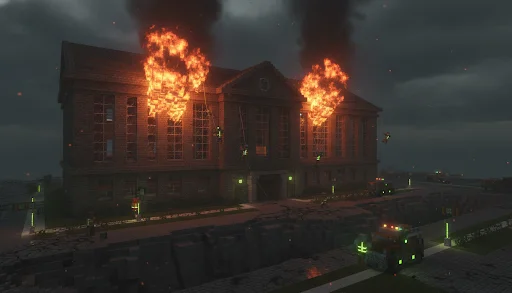
BERONG SMP evolved from an academic "Fire Extinguisher Prototype" into a comprehensive disaster simulation environment. Operating on Minecraft 1.21 via the NeoForge modding API, this platform provides a controlled setting to study human behavior and emergency response during simulated crises.
The environment rigorously tests participants' ability to navigate hazards, utilize safety equipment, and follow established protocols in high-stress, procedurally generated or meticulously reconstructed scenarios.
- 1.21
- NeoForge
- 2+
- Sim Types
Core Systems
Engineered modifications designed for realistic emergency scenarios.
Fire Simulation
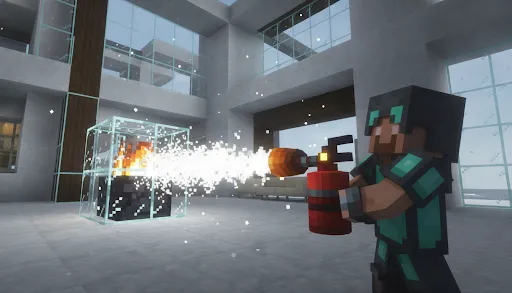
Advanced fire propagation physics and interactive extinguisher mechanics requiring proper P.A.S.S. technique under timed conditions.
Earthquake Engine
Procedural structural degradation, falling debris hazards, and simulated seismic tremors affecting player movement and visibility.
Lobby System
Secure staging area for briefing, equipment loadout, and scenario selection.
Real-Time HUD
Mission timers, objective checklists, and live environmental hazard warnings.
Custom Structures
1:1 scale reconstructions of real-world academic facilities, including the LSPU Library.
Educational Focus
Evaluation systems mapping player actions to established institutional safety protocols.
Deployment Sequence
From first connection to debrief — the four operational phases of every simulation run.
- Phase 01
Connect
Join via NeoForge client.
- Phase 02
Staging
Enter Lobby. Receive briefing.
- Phase 03
Simulate
Execute disaster protocols.
- Phase 04
Review
Analyze HUD metrics.
Connect
Join via NeoForge client.
Simulate
Execute disaster protocols.
Staging
Enter Lobby. Receive briefing.
Review
Analyze HUD metrics.
Visual Logs
View ArchiveAudio-Visual Presentation
Operational Rules
Compliance with all regulations is mandatory. Violations may result in removal from the research cohort.
- R-01
No Griefing
Deliberately destroying participant structures outside sanctioned simulation zones is prohibited.
- R-02
Follow Protocol
During active scenarios, all participants must follow the emergency protocol as briefed in the Lobby.
- R-03
Academic Integrity
This is a thesis research environment. Data is recorded. Interference with simulation metrics constitutes academic misconduct.
- R-04
Respectful Conduct
All participants must maintain respectful conduct toward researchers, moderators, and fellow participants at all times.
How to Join the Server
Follow these steps to download the client installer, set up the mod, and connect to the live simulation environment.
Download Installer
You'll need Minecraft Java Edition already installed — open the official Minecraft Launcher and press Play at least once before continuing.
Click Download Installer below and save the zip file anywhere on your computer.
Run the Installer
Extract the zip, then double-click Install-BerongSMP.exe inside. It automatically installs the mod loader and the mod — nothing else to configure.
Windows may show a blue "protected your PC" screen first — this is expected for a small installer like this. Click More info, then Run anyway.
Launch & Connect
Open the Minecraft Launcher, select the NeoForge 26.1.2.80 profile from the dropdown, and click Play.
From the Minecraft main menu, go to Multiplayer -> Add Server, and paste the server address:
Simulation Requirement
Ensure you log in using your official Microsoft account when prompted by the Minecraft Launcher. The simulation records data for academic research purposes.
Join the Research Cohort
Submit your enrollment request to participate in the BERONG SMP disaster simulation study. A researcher will follow up via email.